
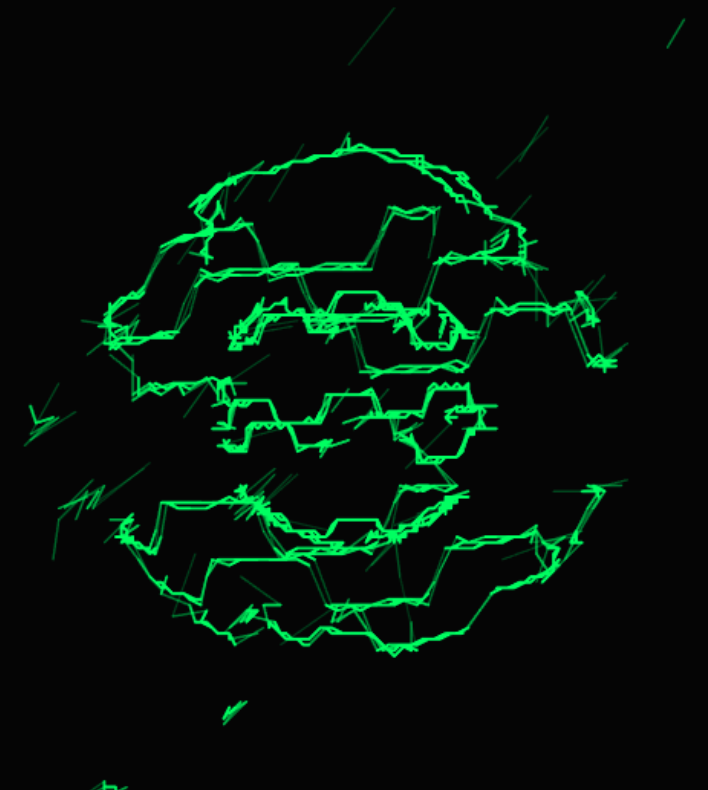
点击黑色区域播放。或者,你也可以上传自己的音乐文件播放。记得戴上耳机。
点屏击开幕始 / 停暂
vector-scope.js
JavaScript
/**
 * VectorScope (无 UI 纯净版)
 *
 * 特性:
 * - 内部管理 Audio 对象
 * - 通过配置对象初始化所有参数
 * - 支持绑定外部按钮触发文件上传
 * - 点击画布切换 播放/暂停
 */
class VectorScope {
    constructor(canvasId, config = {}) {
        this.canvas = document.getElementById(canvasId);
        if (!this.canvas) throw new Error(`Canvas with id ${canvasId} not found`);

        this.ctx = this.canvas.getContext('2d', { alpha: false });

        // 1. 合并配置
        this.config = {
            // 视觉参数
            fftSize: 4096,
            zoom: 1.0,           // 缩放
            intensity: 40,       // 亮度
            jumpThreshold: 100,  // 断线阈值
            bgColor: '#000000',  // 背景色
            lineColor: '0, 255, 0', // 线条颜色 (RGB)

            // 音频参数
            audioUrl: 'https://112.124.69.195:31358/down/32R3puAs4FLK.flac',        // 默认音频 URL
            loop: true,          // 是否循环播放

            // 交互绑定
            uploadButtonId: null, // 上传按钮的 ID (可选)

            ...config
        };

        // 2. 内部状态
        this.audioCtx = null;
        this.sourceNode = null;
        this.analyserL = null;
        this.analyserR = null;
        this.dataArrayL = null;
        this.dataArrayR = null;
        this.rafId = null;
        this.isAudioInit = false;

        this.width = 0;
        this.height = 0;

        // 3. 创建内部 Audio 对象 (不显示在界面上)
        this.audioElement = new Audio();
        this.audioElement.crossOrigin = "anonymous"; // 允许跨域
        this.audioElement.loop = this.config.loop;
        if (this.config.audioUrl) {
            this.audioElement.src = this.config.audioUrl;
        }

        // 4. 初始化
        this._resize();
        this._bindEvents();

        if (this.config.uploadButtonId) {
            this._setupFileUpload(this.config.uploadButtonId);
        }

        window.addEventListener('resize', () => this._resize());
    }

    // --- 内部逻辑 ---

    _bindEvents() {
        // 点击画布控制播放/暂停 (同时解决浏览器自动播放限制)
        this.canvas.addEventListener('click', () => {
            if (!this.isAudioInit) {
                this._initAudioContext();
            }

            if (this.audioCtx.state === 'suspended') {
                this.audioCtx.resume();
            }

            if (this.audioElement.paused) {
                this.audioElement.play().catch(e => console.error("Play error:", e));
            } else {
                this.audioElement.pause();
            }
        });
    }

    _setupFileUpload(btnId) {
        const btn = document.getElementById(btnId);
        if (!btn) {
            console.warn(`Upload button with id '${btnId}' not found.`);
            return;
        }

        // 创建一个隐藏的 input[type=file]
        const hiddenInput = document.createElement('input');
        hiddenInput.type = 'file';
        hiddenInput.accept = 'audio/*';
        hiddenInput.style.display = 'none';
        document.body.appendChild(hiddenInput);

        // 按钮点击 -> 触发 input 点击
        btn.addEventListener('click', () => {
            hiddenInput.click();
        });

        // 文件选择处理
        hiddenInput.addEventListener('change', (e) => {
            const file = e.target.files[0];
            if (file) {
                const fileUrl = URL.createObjectURL(file);
                this.audioElement.src = fileUrl;

                // 确保音频环境已就绪并播放
                if (!this.isAudioInit) this._initAudioContext();
                this.audioElement.play();
            }
        });
    }

    _initAudioContext() {
        if (this.isAudioInit) return;

        const AudioContext = window.AudioContext || window.webkitAudioContext;
        this.audioCtx = new AudioContext();

        // 创建节点
        const splitter = this.audioCtx.createChannelSplitter(2);
        this.analyserL = this.audioCtx.createAnalyser();
        this.analyserR = this.audioCtx.createAnalyser();

        this.analyserL.fftSize = this.config.fftSize;
        this.analyserR.fftSize = this.config.fftSize;

        // 连接路由
        // 只有首次播放时才创建 MediaElementSource,避免报错
        if (!this.sourceNode) {
            this.sourceNode = this.audioCtx.createMediaElementSource(this.audioElement);
        }

        this.sourceNode.connect(splitter);
        splitter.connect(this.analyserL, 0);
        splitter.connect(this.analyserR, 1);
        this.sourceNode.connect(this.audioCtx.destination); // 只有连这个才能听到声音

        // 准备数据容器
        const len = this.analyserL.frequencyBinCount;
        this.dataArrayL = new Uint8Array(len);
        this.dataArrayR = new Uint8Array(len);

        this.isAudioInit = true;
        this._startLoop();
    }

    _resize() {
        // 自动适应父容器
        const parent = this.canvas.parentElement;
        this.width = parent ? parent.clientWidth : window.innerWidth;
        this.height = parent ? parent.clientHeight : window.innerHeight;

        this.canvas.width = this.width;
        this.canvas.height = this.height;
    }

    _startLoop() {
        if (this.rafId) cancelAnimationFrame(this.rafId);
        const loop = () => {
            this._draw();
            this.rafId = requestAnimationFrame(loop);
        };
        loop();
    }

    _draw() {
        if (!this.isAudioInit || this.audioElement.paused) {
            // 暂停时可以画个黑屏或者保持最后一帧,这里选择清空
            if (this.audioElement.paused) {
                // 可选:在这里 requestAnimationFrame 保持运行,或者暂停循环
                // 为了响应窗口变化,建议保持循环但只清屏
            }
        }

        if (this.isAudioInit) {
            this.analyserL.getByteTimeDomainData(this.dataArrayL);
            this.analyserR.getByteTimeDomainData(this.dataArrayR);
        }

        // 清屏
        this.ctx.fillStyle = this.config.bgColor;
        this.ctx.fillRect(0, 0, this.width, this.height);

        // 如果没有音频数据,就不画线
        if (!this.isAudioInit) return;

        this.ctx.lineCap = 'round';

        const cx = this.width / 2;
        const cy = this.height / 2;
        // 应用缩放配置
        const baseScale = (Math.min(this.width, this.height) * 0.45) * this.config.zoom;
        const len = this.dataArrayL.length;
        const step = 1;

        // 预计算起点
        let prevX = (this.dataArrayL[0] / 128.0 - 1.0) * baseScale + cx;
        let prevY = -(this.dataArrayR[0] / 128.0 - 1.0) * baseScale + cy;

        for (let i = step; i < len; i += step) {
            const vL = (this.dataArrayL[i] / 128.0) - 1.0;
            const vR = (this.dataArrayR[i] / 128.0) - 1.0;

            const x = vL * baseScale + cx;
            const y = -vR * baseScale + cy;

            const dx = x - prevX;
            const dy = y - prevY;
            const dist = Math.sqrt(dx * dx + dy * dy);

            // 应用断线阈值配置
            if (dist > this.config.jumpThreshold) {
                prevX = x;
                prevY = y;
                continue;
            }

            if (dist < 0.5) continue;

            // 应用亮度配置
            let alpha = this.config.intensity / dist;
            if (alpha > 1.0) alpha = 1.0;
            if (alpha < 0.05) alpha = 0.05;

            this.ctx.beginPath();
            // 应用颜色配置
            this.ctx.strokeStyle = `rgba(${this.config.lineColor}, ${alpha})`;
            this.ctx.lineWidth = 1 + alpha;

            this.ctx.moveTo(prevX, prevY);
            this.ctx.lineTo(x, y);
            this.ctx.stroke();

            prevX = x;
            prevY = y;
        }
    }
}vector-scope.html
HTML
<!DOCTYPE html>
<html lang="zh-CN">

<head>
    <meta charset="UTF-8">
    <meta name="viewport" content="width=device-width, initial-scale=1.0">
    <title>Minimal Vector Scope</title>
    <style>
        body {
            margin: 0;
            background: #000;
            overflow: hidden;
            font-family: sans-serif;
        }

        /* 全屏容器 */
        #scope-canvas {
            display: block;
            width: 100vw;
            height: 100vh;
            cursor: pointer;
            /* 提示可点击 */
        }

        /* 自定义样式的上传按钮 (悬浮在右上角) */
        #my-upload-btn {
            position: absolute;
            top: 20px;
            right: 20px;
            padding: 10px 20px;
            background: rgba(0, 50, 0, 0.6);
            border: 1px solid #0f0;
            color: #0f0;
            cursor: pointer;
            border-radius: 4px;
            font-size: 14px;
            z-index: 10;
            transition: all 0.3s;
        }

        #my-upload-btn:hover {
            background: #0f0;
            color: #000;
        }

        /* 提示文字 */
        .hint {
            position: absolute;
            bottom: 20px;
            width: 100%;
            text-align: center;
            color: rgba(0, 255, 0, 0.3);
            pointer-events: none;
            font-size: 12px;
        }
    </style>
</head>

<body>

    <!-- 画布 -->
    <canvas id="scope-canvas"></canvas>

    <!-- 用户自定义的按钮,ID 将被绑定到 JS 配置中 -->
    <button id="my-upload-btn">Upload Local File</button>

    <div class="hint">CLICK SCREEN TO PLAY / PAUSE</div>

    <!-- 引入逻辑 -->
    <script src="vector-scope.js"></script>

    <script>
        // 实例化:所有参数在此处一次性配置
        const scope = new VectorScope('scope-canvas', {
            // 音频设置
            // 你可以填入一个支持跨域的 URL,或者留空等待上传
            audioUrl: 'https://www.wenzhimo.xyz/wp-content/uploads/2026/01/Primer%20Final.flac',

            // 绑定上传按钮的 ID
            uploadButtonId: 'my-upload-btn',

            // 视觉设置 (手动调整这里的值来放大缩小)
            zoom: 1.2,           // 1.0 是标准大小,1.5 放大,0.5 缩小
            intensity: 10,       // 亮度增强
            jumpThreshold: 50,  // 断线判定距离

            // 颜色设置
            lineColor: '0, 255, 100', // 青绿色
            bgColor: '#050505'
        });

        console.log("Vector Scope Initialized. Click screen to start.");
    </script>

</body>

</html>
发表回复